sapl sansquare automation sapltech

How to Choose the Right Number of Fiber Cores for Your Network

Fiber optic cables are a cornerstone of modern networking, delivering high-speed and reliable data transmission. Among their key attributes, the number of fiber cores plays a vital role in determining data capacity and overall network performance. Understanding this fundamental aspect can help you make informed choices when planning or upgrading your network. This article provides an overview of fiber cores and practical tips for selecting the right number to meet your networking needs. Understanding Fiber Cores Fiber cores are the central components of fiber optic cables, responsible for transmitting light signals that carry data. They are typically made of high-quality glass or plastic and directly influence the cable’s performance. To calculate the total number of cores for a single fiber patch cable, use the following formula: Total number of cores = Number of branches × Number of cores per branch If there are no branches, the number of branches equals one. For example, an MTP®-8 trunk cable with four branches and eight cores per branch has a total of 32 cores (4 × 8 = 32).   Selecting the Right Number of Fiber Cores When planning your fiber optic network, several factors should be considered to ensure optimal performance and future scalability. 1. Assess Device Requirements A basic guideline is that each device typically requires two cores: one for sending and one for receiving data. Start by counting the number of devices you need to connect. For instance, connecting 10 devices would typically require 20 cores. However, advanced equipment supporting serial communication or device multiplexing may reduce the number of required cores. 2. Evaluate Costs Strategically While cables with higher core counts have a higher initial cost, they can be more cost-effective in the long run if network growth is anticipated. It’s often wiser to invest in a slightly larger core count upfront to avoid expensive replacements later. Strike a balance between your current budget and long-term needs. 3. Follow Industry Standards Industry standards can serve as a helpful reference when selecting fiber cores: 12-core cables: Common for communication rooms within buildings. 24-core cables: Typically used for main distribution rooms. 48-core cables: Ideal for larger, high-capacity setups. The IBDN standard recommends these configurations to ensure compatibility and manageability. Recommendations for Different Networking Scenarios To meet diverse network requirements, consider the following fiber core configurations for enterprise networks and data centers. Enterprise Networks Fiber Patch Cables (1 or 2 Fiber Cores): Ideal for connecting network devices such as switches, routers, and servers. These cables enable stable, high-speed connectivity and support efficient network management. Indoor Multifiber Cables: Suitable for structured cabling along fixed paths. They offer a cost-effective solution for moderate bandwidth and scalable enterprise environments. Data Centers Simplex Fiber Patch Cables (1 Fiber Core): Best for unidirectional data transmission in applications like surveillance or broadcasting. When paired with BiDi modules, they can support bidirectional communication. Duplex Fiber Patch Cables (2 Fiber Cores): Ideal for bidirectional communication between devices, such as switches and routers. High-Density MTP®/MPO Fiber Cables (Multi-Core): Crucial for high-density cabling, these cables enable efficient large-scale inter-rack connections and rate migration. Uniboot Fiber Patch Cables (2 Fiber Cores): With their space-saving design, they are perfect for high-density interconnections within data centers, reducing cable clutter. Conclusion Choosing the right number of fiber cores is essential for building an efficient and scalable network. By evaluating factors such as the number of connected devices, cost considerations, and industry standards, you can make a well-informed decision that supports both your current and future networking needs. A thoughtful selection of fiber cores ensures optimized performance and a future-proof infrastructure.

sapl sansquare automation sapltech

Bandwidth vs Throughput. Keys to Network Efficiency

What Is Bandwidth? Bandwidth refers to the maximum amount of data that can be transmitted across a network from a source to a destination within a specified period. It represents the network’s potential capacity for data transfer, typically measured in bits per second (bps). Common units of measurement include kilobits per second (kbps), megabits per second (Mbps), and gigabits per second (Gbps). To visualize bandwidth, think of it as the width of a water pipe: a wider pipe allows more water to flow through simultaneously, just as higher bandwidth enables a network to transport more data at once. Bandwidth reflects the theoretical data transfer limit of a network under optimal conditions. Importance of Bandwidth Bandwidth is a critical factor in determining internet speed and download times. Since it is a limited resource, managing it efficiently is essential. Different devices and applications consume varying amounts of bandwidth, and insufficient bandwidth can lead to network congestion and slow performance. Key Benefits of High Bandwidth Enhanced Online Experiences: High bandwidth allows for faster data transfer, essential for smooth streaming, quick downloads, and responsive web browsing, leading to improved user satisfaction. Multidevice Connectivity: Adequate bandwidth supports multiple devices operating simultaneously on the same network without compromising speed or performance, which is crucial for homes and workplaces. Smooth Video Conferencing: Stable and high-quality video and audio during online meetings depend on sufficient bandwidth, enabling effective remote communication and collaboration. Support for Modern Applications: Emerging technologies such as cloud computing, virtual reality, and IoT require significant bandwidth to function optimally. High bandwidth ensures these applications run seamlessly. Reduced Latency and Congestion: Sufficient bandwidth helps minimize delays and prevents network congestion, ensuring consistent and reliable connectivity even during peak usage periods. Factors Influencing Network Performance The performance of a network depends on several devices and components, including: Network Switches: Devices that efficiently manage data transmission within a network. Routers: Direct data packets between networks. Wireless Access Points: Enable devices to connect to the network wirelessly. Firewalls: Provide security and manage data flow to ensure safe communication. Key Factors Influencing Network Bandwidth and Throughput Key Factors Influencing Network Bandwidth Here are some essential elements that affect bandwidth: Network Infrastructure The network infrastructure, including the types of cables and devices used, significantly influences bandwidth. Fiber optic cables generally offer higher bandwidth compared to copper wires. Additionally, the quality and capability of networking equipment such as routers, switches, and modems can either enhance or limit potential bandwidth. Internet Service Providers (ISPs) ISPs play a crucial role in determining bandwidth by setting limits and offering various service plans. Different packages provide varying levels of maximum bandwidth, with higher-tier plans typically offering faster speeds and more reliable connections. Network management practices like throttling can also affect the user’s bandwidth experience. Network Traffic and Load The amount and type of data being transmitted over the network can impact available bandwidth. Heavy traffic, especially during peak usage times, can cause congestion and slow down data transfer rates. Applications that require high data rates, such as streaming and large downloads, can consume significant bandwidth, impacting other activities. Network Topology and Design The design and structure of a network, including its topology, influence how bandwidth is distributed and utilized. A well-planned network design minimizes potential bottlenecks and optimizes performance. Conversely, complex or poorly configured network structures can lead to inefficient bandwidth usage and degraded performance. Physical and Environmental Conditions Physical distances between devices and infrastructure can impact bandwidth, particularly in networks spanning large geographic areas. Environmental factors such as electromagnetic interference and physical obstructions can degrade signal quality, especially in wireless networks, thus affecting bandwidth availability. User Behavior and Application Demands User activities and the applications they use significantly affect bandwidth. High-demand applications such as video conferencing, online gaming, and cloud services require substantial bandwidth for optimal performance. Additionally, user settings and network practices, such as inefficient Wi-Fi configurations, can influence how effectively bandwidth is utilized. What Is Throughput? Throughput measures the amount of data that successfully travels across a network from a source to a destination within a specified timeframe. It specifically indicates the rate at which data packets or messages arrive at their intended recipient, typically measured in bits per second (bps) or data packets per second (pps). Assessing throughput is essential for evaluating, troubleshooting, and enhancing network performance, as it can help identify the underlying causes of slow or poor connections. When users make requests, such as visiting a website, using an application, making a phone call, or downloading files, they expect prompt and high-quality responses. High throughput signifies that a network is efficiently transmitting a large volume of data per second, thereby fulfilling user requests quickly and contributing to overall performance. Why Throughput Matters High throughput offers numerous advantages to networks: Enhanced Productivity: High-performance switches like the FS S5810-48TS significantly boost productivity by increasing the amount of work completed in a given time. This leads to efficient operations, better resource utilization, and minimized bottlenecks, resulting in higher output and profitability. Cost Reduction: Improving throughput reduces costs by enhancing process efficiency. It enables economies of scale, lowers operational expenses, and optimizes labor, contributing directly to savings and improved profit margins. Competitive Advantage: Higher throughput allows businesses to deliver products and services faster, giving them a competitive edge. This responsiveness helps meet customer demands and adapt to market changes, attracting more clients. Scalability and Growth: High throughput is vital for scalability as businesses expand. It ensures processes can handle increased volumes without compromising quality, supporting long-term growth and market entry. Key Factors Influencing Throughput Here are some elements that affect throughput: Bandwidth Capacity Higher bandwidth allows more data to flow at a given time, directly affecting throughput. Networks with greater bandwidth capacity can handle larger volumes of traffic more efficiently, thus improving overall throughput. Network Latency Latency is the delay in data transmission within a network. High latency can significantly reduce throughput as it slows down the rate at which data packets are delivered. Minimizing latency through optimized routing and faster transmission technologies …

Advantages of Stacking Network Switches

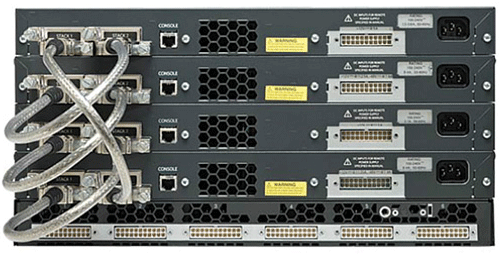
Stacking network switches is a practical solution for building an efficient local area network (LAN) at home or in the office. When multiple devices need to be connected, combining network switches enables them to function as a unified switch, simplifying management while boosting bandwidth through increased ports. This approach enhances network availability, scalability, and performance, often serving as a cost-effective alternative to upgrading to larger, more powerful switches. It’s important to note that stacking isn’t just about physically placing switches on a shelf. Stackable switches offer advanced functionality, allowing seamless management through a single IP address. They can share resources and configurations, making remote administration straightforward. Additionally, many stacking solutions provide flexibility, enabling users to combine different technologies, models, and in some cases, even brands. Here are key advantages of using stackable switches: Simplified management By stacking switches, you essentially bring them together under a unified system. This simplifies management significantly, especially in busy networks with multiple switches. With a single IP address, you can oversee and control the entire stack, making administration far more convenient and efficient. The stack master switch handles configurations and passes them to all other switches in the group, saving both time and effort compared to managing each switch individually. This streamlined approach also reduces operational costs. Increased Bandwidth Switch stacking and port aggregation are powerful techniques to enhance network bandwidth and reliability by bundling physical ports into logical connections. Stackable switches often provide significantly higher bandwidth, with some models exceeding 200Gb (e.g., 20 ports rated at 10Gb each). In contrast, standalone switches typically offer only a few 10Gb ports, if any. These capabilities make stacked switches ideal for environments that demand high-performance networking, such as data centers, advanced home labs, and video streaming setups where handling large volumes of data efficiently is crucial. High Availability The architecture of a switch stack inherently supports redundancy, ensuring network stability even during outages. If the stack master fails, a backup switch seamlessly takes over, maintaining uninterrupted operations. Additionally, link aggregation across multiple devices creates logical connections that boost both bandwidth and redundancy. This design minimizes the risk of a single point of failure, helping to maintain a stable, reliable, and high-performing network. Stackable switches excel in delivering these advantages and more. Scalability Stackable and modular solutions, such as stackable network switches, naturally offer greater scalability. While you could keep purchasing standalone switches and mounting them in a cabinet, this approach misses out on the full potential of stackable systems. Unlike standalone switches, which require individual management, stackable switches function as a single entity, streamlining administration. Unless standalone switches support cloud management — a completely different approach — managing them can be far more tedious and inefficient. Stackable switches aren’t the ideal solution for everyone. They won’t address all network-related challenges and are best suited for specific use cases based on your network requirements. Compared to standalone switches, stacks come with certain drawbacks. One major consideration is cost—modular chassis systems can often be more economical and customizable to meet extensive port requirements. Additionally, stackable switches require specialized hardware with stack-compatible architectures, which may not provide the same level of resiliency and redundancy as high-end modular switches. Conclusion Stackable switches aren’t the ideal solution for everyone. They won’t address all network-related challenges and are best suited for specific use cases based on your network requirements. Compared to standalone switches, stacks come with certain drawbacks. One major consideration is cost—modular chassis systems can often be more economical and customizable to meet extensive port requirements. Additionally, stackable switches require specialized hardware with stack-compatible architectures, which may not provide the same level of resiliency and redundancy as high-end modular switches.

sapl sansquare automation

Plesk vs CPanel

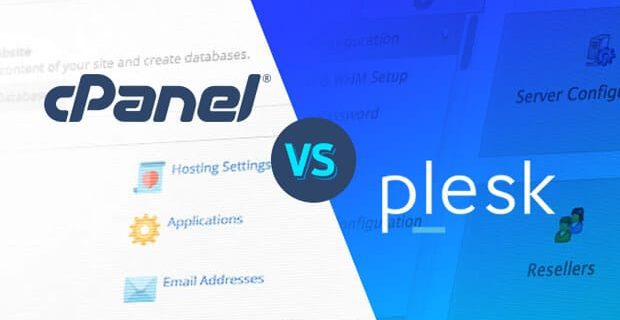
When selecting a web host for your next project, one of the first decisions you’ll need to make is choosing the right control panel for managing your server. Two of the most popular options are cPanel and Plesk, both offering powerful features for server management. But which one is better for your needs? Let’s dive into a detailed comparison between cPanel and Plesk to help you decide. What Is a Web Hosting Control Panel? A web hosting control panel provides a web-based interface that simplifies managing your hosting setup. It allows you to perform tasks like managing domain names, files, email accounts, databases, server stats, security, and server software installation—all through an intuitive graphical interface. The control panel’s main benefit is its ease of use, enabling end-users to handle most of the server management tasks without needing technical expertise. cPanel vs Plesk: A Side-by-Side Comparison Both cPanel and Plesk are industry-leading control panels, but they have some distinct differences. Origins cPanel was released in 1996 and became the standard for managing Linux-based hosting environments. Plesk was introduced in 2001 as a solution for managing Windows-based servers but also supports Linux. It has since become a versatile control panel for both operating systems. User Interface and Ease of Use cPanel: The dashboard is known for its user-friendly design, especially for beginners. It offers a wide range of features clearly labeled in colorful icons, making it easy to navigate. Plesk: Plesk’s interface is organized around individual sites, with settings tailored for each one. It displays top-level settings in a side panel for easy access, focusing more on the domains or sites rather than individual features. User Interface AfterBefore Noteworthy Features cPanel: More commonly used by hosting providers and tends to be more affordable for end-users. Supports free SSL certificates via Let’s Encrypt (AutoSSL). Automatic backups and restoration. Works on fewer operating systems but supports Amazon Linux (which Plesk does not). Plesk: Can run on both Windows and various Linux distributions (including Debian, Ubuntu, CentOS, Red Hat, CloudLinux, and Virtuozzo). Supports Docker, Git, Node.js, and WordPress Toolkit for easier site management and automation. SSL certificates are easy to integrate with one click. Includes features for managing WordPress sites, such as automatic updates, security patches, and bug fixes. Security Features cPanel: Includes AutoSSL for automatic SSL installations, brute force protection (cPHulk), firewall support (CSF), IP blocking, SSH access, and ModSecurity. Plesk: Offers Plesk’s custom firewall, ImunifyAV for malware detection, Fail2ban for banning malicious IPs, and also supports AutoSSL. Cost Comparison The cost of using cPanel or Plesk depends on whether you are purchasing the control panel independently or using a hosting provider that includes it. For Hosting Providers: cPanel tends to be cheaper, especially for entry-level hosting. Plesk may have a higher cost, particularly for high-performance or enterprise-level hosting. For Installing on Your Own Server: Plesk is generally more affordable if you’re installing it yourself on a server. cPanel tends to have a higher cost for self-installation. Conclusion: Which One Is Better? The choice between cPanel and Plesk ultimately comes down to your specific needs. Here’s a summary: Choose cPanel if: You’re working with a Linux-based server. You prefer a more beginner-friendly interface. You’re looking for a cost-effective option from a hosting provider. Choose Plesk if: You need support for both Windows and Linux environments. You want additional automation features, especially for managing WordPress sites. You’re comfortable with a slightly more complex interface. Conclusion Both cPanel and Plesk are excellent tools for web hosting management, each with its own strengths. Whichever you choose, both offer robust features to manage your server efficiently, backed by active communities for support.

sapl sansquare automation

AI to the future

As artificial intelligence (AI) adoption accelerates, data centers are facing mounting pressure to meet the growing demand for data processing and storage. Wes Swenson, CEO of Novva Data Centers, explores the profound impact of AI, IoT, and big data on the data center industry, highlighting key areas such as performance, efficiency, security, and the integration of chatbots. Emerging technologies like AI are advancing rapidly, putting the data center industry in the spotlight as it must adapt to new demands and challenges. With AI tools, such as ChatGPT, reaching over 1 billion users by March 2023, the data center sector is particularly impacted. As AI, the Internet of Things (IoT), big data, and other data-heavy applications rise, data centers must handle an increasing volume of information while maintaining top-tier performance, security, and efficiency. The impact of these emerging trends on data centers is clear, with growing demands for performance, potential for improved efficiency, new security challenges, and an expanding role for chatbots and virtual assistants in managing data center operations. As the industry braces for these technological shifts, several future trends warrant closer examination to understand how they will reshape the workforce and operations. Rising Performance Demands The rise of AI-driven tools is fueling a surge in demand for computational power and faster processing speeds. Data centers are at the heart of providing the infrastructure necessary to meet these demands. To address this, data centers are adopting new infrastructure innovations and cooling technologies to enhance performance and efficiency. However, it’s not all challenges. AI is also serving as a tool for driving data center innovation. By harnessing AI, data centers can optimize performance, automate maintenance, and adjust resource allocation to ensure leaner operations. AI tools are also used to analyze data center performance, identify areas for improvement, and even optimize energy usage. Boosting Efficiency Efficiency is a top priority in the data center industry, especially considering its significant contribution to global energy consumption, accounting for 1% of total usage. The industry is under increasing scrutiny to improve its environmental impact. AI and machine learning are playing a key role in addressing these concerns by optimizing operations to reduce energy consumption. For example, AI-powered algorithms can predict server failures, prevent downtime, and reduce energy waste, all of which contribute to more efficient operations. Edge computing is another promising solution that’s helping to reduce reliance on large, centralized data centers. By processing and storing data closer to its source, edge computing minimizes latency and enhances performance, while also lowering energy usage. AI is also transforming how data centers manage resources, allowing operators to make more informed decisions about energy consumption and resource allocation. By utilizing AI to optimize cooling systems, power usage, and other operational factors, data centers can reduce their energy footprint, increase efficiency, and extend the lifespan of hardware. Security and Chatbots As the adoption of AI and IoT continues to grow, security concerns also rise. Data centers must fortify their security strategies to protect sensitive information and critical infrastructure from cyber threats. AI-driven security tools are becoming essential to detecting vulnerabilities, preventing attacks, and securing data flow. Chatbots and virtual assistants are becoming increasingly important in data center operations. By automating routine tasks and assisting operators with day-to-day management, AI-driven chatbots streamline workflows, improve operational efficiency, and reduce human error. Conclusion AI, IoT, and big data are driving massive changes in the data center industry, presenting both challenges and opportunities. As performance demands rise, data centers are leveraging AI and machine learning to optimize operations, reduce energy consumption, and enhance security. Edge computing is also emerging as a solution to boost performance and efficiency, while chatbots and virtual assistants are playing a pivotal role in day-to-day management. As these trends continue to evolve, data centers must adapt to stay ahead of the curve and support the ever-growing demand for data processing and storage. Rising Performance Demands The rise of AI-driven tools is fueling a surge in demand for computational power and faster processing speeds. Data centers are at the heart of providing the infrastructure necessary to meet these demands. To address this, data centers are adopting new infrastructure innovations and cooling technologies to enhance performance and efficiency. However, it’s not all challenges. AI is also serving as a tool for driving data center innovation. By harnessing AI, data centers can optimize performance, automate maintenance, and adjust resource allocation to ensure leaner operations. AI tools are also used to analyze data center performance, identify areas for improvement, and even optimize energy usage. Boosting Efficiency Efficiency is a top priority in the data center industry, especially considering its significant contribution to global energy consumption, accounting for 1% of total usage. The industry is under increasing scrutiny to improve its environmental impact. AI and machine learning are playing a key role in addressing these concerns by optimizing operations to reduce energy consumption. For example, AI-powered algorithms can predict server failures, prevent downtime, and reduce energy waste, all of which contribute to more efficient operations. Edge computing is another promising solution that’s helping to reduce reliance on large, centralized data centers. By processing and storing data closer to its source, edge computing minimizes latency and enhances performance, while also lowering energy usage. AI is also transforming how data centers manage resources, allowing operators to make more informed decisions about energy consumption and resource allocation. By utilizing AI to optimize cooling systems, power usage, and other operational factors, data centers can reduce their energy footprint, increase efficiency, and extend the lifespan of hardware. Security and Chatbots As the adoption of AI and IoT continues to grow, security concerns also rise. Data centers must fortify their security strategies to protect sensitive information and critical infrastructure from cyber threats. AI-driven security tools are becoming essential to detecting vulnerabilities, preventing attacks, and securing data flow. Chatbots and virtual assistants are becoming increasingly important in data center operations. By automating routine tasks and assisting operators with day-to-day management, AI-driven chatbots streamline workflows, improve operational efficiency, and reduce human …