
Where is Avaya? A Look at the Company’s Global Presence

Where is Avaya? A Look at the Company’s Global Presence Avaya, formerly Lucent, formerly AT & T formerly Bell Labs, established by the inventor of the telephone Alexander Graham Bell; have filed for Chapter 11 protection. Avaya is a well-known name in the world of business communications, offering cutting-edge solutions in cloud communications, collaboration, and customer experience. Despite its ups and downs in the corporate landscape, Avaya continues to be a significant player globally. But where exactly is Avaya today? Let’s explore its presence, operations, and recent developments. Fixed Line voice is one of the least used communications technologies. Video, IM, Web Chat, Web Conferencing, Mobile Voice, Collaborative Communication, Social Media and Email are all ahead of voice, as communication is refined and targeted for maximum return. Avaya’s Global Headquarters Avaya’s corporate headquarters is located in Morristown, New Jersey, USA. This serves as the central hub for its global operations, strategy, and innovation. Avaya’s corporate headquarters is located in Morristown, New Jersey, USA. This serves as the central hub for its global operations, strategy, and innovation. Avaya’s Global Headquarters United States Headquarters and R&D centers India Development and support centers in Pune, Bengaluru, and Hyderabad United Kingdom Regional office serving European markets UAE Key hub for Middle Eastern operations Australia & Singapore: Supporting Asia-Pacific growth Avaya in India: Still in the Market? Despite rumors and concerns, Avaya remains active in the Indian market. It operates with a significant workforce in India and serves major clients such as Airtel and the State Bank of India. Avaya has development centers in Pune, Bengaluru, and Hyderabad and continues to invest in the region, with plans to expand its talent pool. Challenges and Restructuring Avaya faced financial difficulties, leading to Chapter 11 bankruptcy proceedings in the U.S. However, this restructuring has not affected its global operations significantly. The company has reaffirmed its commitment to serving its customers and partners worldwide. Future of Avaya Avaya is focusing on artificial intelligence (AI), cloud communications, and customer experience solutions to stay competitive. With a shift towards subscription-based models and cloud-first strategies, Avaya aims to continue delivering value to enterprises worldwide. Conclusion Avaya is still a key player in the global communication technology industry. While it has undergone restructuring, the company maintains a strong presence in various markets, including India. Businesses relying on Avaya solutions can expect continued support and innovation in the years ahead. For more updates on networking, AI, and enterprise technology, visit sapltech.com.

sapltech

Mesh Router vs. Wi-Fi Extender: Which Is Better?

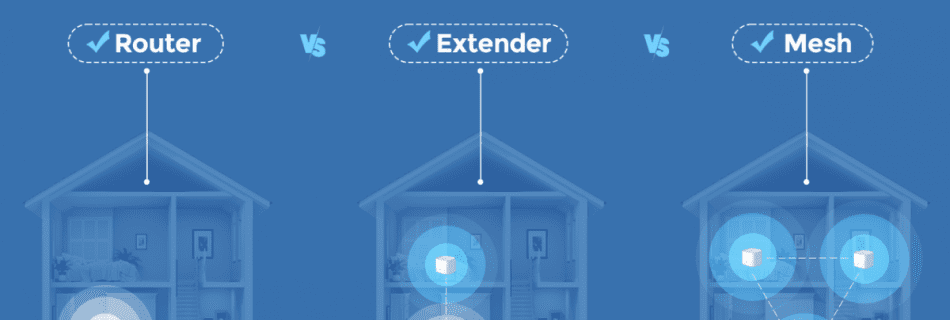
Wi-Fi routers have become significantly more powerful in recent years, yet they still face challenges when it comes to penetrating walls and floors. If you’re experiencing slow speeds in a particular room or an entire level of your home, you generally have two solutions: install a Wi-Fi booster with your current router or upgrade to a comprehensive mesh network system featuring range-expanding satellite devices, often referred to as nodes. Wi-Fi boosters are an economical choice for smaller areas. The top model I’ve tested so far is the Linksys RE7310, available for Rs 9000. There are also more affordable alternatives on the market. On the other hand, mesh routers are ideal for whole-home connectivity. We have several suggestions, including the TP-Link Deco W7200 and the Eero 6 Plus, both priced around Rs 15000 for a two-unit pack. A Wi-Fi extender is the more straightforward and budget-friendly solution — you simply plug it into a power outlet and link it to your current router. However, a mesh router offers significantly better performance when it comes to enhancing speeds across your entire home. There are also a few preliminary measures you can try to improve your connection without making a purchase, but in many instances, resolving dead zones will necessitate a hardware upgrade. That’s the brief summary — here’s how I arrived at these conclusions. Like real estate, wireless networking boils down to three key factors: location, location, location. Whether you opt for a range extender or a mesh extender, both will broadcast a network signal that’s only as strong as the incoming signal from your router—minus any degradation caused by the distance. If you’re struggling to connect in a specific area of your home, the smartest strategy is to run speed tests in various rooms. Your goal is to identify the spot nearest to the dead zone where the router’s signal remains strong. Placing the range extender or mesh point there will ensure it can deliver the best possible network performance and effectively cover the dead zone. After that, all that remains is selecting the right hardware for your needs. Wi-Fi Range Extenders: An Effective Solution for Small Dead ZonesIf your connection struggles in just one or two rooms, a basic Wi-Fi range extender might be all you need. There are plenty of choices available, but the best value I’ve tested is the TP-Link RE220, a plug-in extender that’s widely available online for as little as Rs 1500. If you’re open to spending a bit more, consider the TP-Link RE605X, which offers faster speeds, greater reliability, and Wi-Fi 6 support for Rs 6000. Range extenders like these are incredibly simple to set up. Just plug it in, press the WPS button to activate Wi-Fi Protected Setup mode, and then press the WPS button on your router to pair them. Rather than boosting your existing network, the extender creates its own network using your router’s signal. Typically, this new network will appear as your original network name with “_EXT” added to the end. Mesh Routers: The Best Choice for Whole-Home CoverageIf your connectivity issues go beyond a single room—like an entire floor with spotty speeds—upgrading to a mesh router is likely your best solution. Featuring multiple devices placed strategically throughout your home, a quality mesh router can deliver a strong, seamless signal across rooms. Unlike a range extender, mesh systems allow you to stay connected to the same network throughout your home (or two networks if you choose to separate the 2.4 GHz and 5 GHz bands). The market is currently experiencing a bit of a mesh router renaissance, with second-generation options becoming more affordable. While prices have dropped, you should still budget at least Rs 12000 for an entry-level system and significantly more for high-end models. Software Matters:One key factor to consider is the router’s software. Mesh systems rely on algorithms to optimize your connection, dynamically choosing the best route based on your location. High-quality systems seamlessly switch between connecting directly to the router and using one of the satellites. On the other hand, systems with less advanced software might misroute your connection, unnecessarily slowing things down. In my testing, brands like Google, Eero, and Asus excel at smart routing, reliably managing connection drops or slowdowns. Netgear and TP-Link also performed well but occasionally showed some hiccups on specific models Optimal Setup for Large Homes:If you have a larger home, investing in a three-piece system is a wise choice. While Nest offers excellent options, Eero stands out for its strong software and affordability. For instance, the Eero 6 system provides a three-piece setup for Rs 18000, complete with Wi-Fi 6 compatibility. While the Eero 6 wasn’t as sharp as Nest in steering connections during my tests, adding a second satellite noticeably improved overall performance. In a 5,800-square-foot home, we tested a three-piece Eero system, placing the second satellite in the basement. The heat map showed a substantial improvement in signal strength throughout the home, particularly in the basement.

sapl sansquare automation

pfSense vs FortiGate – Which Firewall Solution is Superior?

In the search for a comprehensive firewall Pfsense and Fortigate are two options that consistently top the list of choices. Which one should you go for? When it comes to choosing the right software for your specified needs, it is seldom as simple as picking the best rated or cheapest option. It requires you to analyse your needs against your current hardware and software capabilities and using this analysis to examine the available options before settling on one firewall software. Both pfsense and Fortigate use different operating systems, which already makes their systems of functionality very different but they both use a GUI (Graphical user interface), making them fairly easy to use compared to a command line. They both are highly rated and widely used security software, with a lot of functional similarities but few yet significant differences. What are the differences between Pfsense and Fortigate? Feature Pfsense Fortigate (Winner) Operating System Free BSD FortiOS Price Free Paid User Interface Graphical User Interface Graphical User Interface as well as a Command User Interface Intrusion Protection System Yes Yes Secure Socket Layers No Yes Cloud security No Yes Pfsense Vs Fortigate- How do they compare? Pricing Pfsense is free while Fortigate is paid. However, there is a version of pfsense, (Pfsense-pro), which is paid and rivals Fortigate better than the common free and open source version. Comparing pfsense-pro to Fortigate in terms of cost, Fortigate is definitely more affordable. Keeping in mind that the common version of pfsense, and the subject of this review is free, Fortigate seems pricey. The chances of getting errors and bugs in pfsense is higher because it is open source. However, the developers frequently release new versions and updates to combat this, which could be tasking to a user to keep up with.   Operating systems As highlighted in the comparative table, Pfsense uses the free BSD operating system while Fortigate uses a specialized FortiOS. There are several implications of this for both software; the first is that because it is specialized for cyber security, the FortiOS is safer and less prone to bugs and errors than the free BSD operating system. Because it is free and open source, the codes on the free BSD operating system can easily be tweaked and re-written to be used as a basis for a completely different software, which is not the same for FortiOS. Ease of use As mentioned above, both Pfsense and Fortigate use a GUI to interact with the user, making them easier to use than your average firewall software. However, the GUI on Fortigate is very intuitive and easy to use, making it easier to navigate than pfsense. The interface on Pfsense contains a lot of side and drop menus that are very confusing for a new user, compared to the well laid out and intuitive arrangement that Fortigate has.Fortigate gives the user the option to use a command line interface together with the GUI, which is not the case for pfsense. This option allows experienced CLI users to quickly adapt to the system as well as making it faster and more efficient. It also adds a new flexibility to the software that pfsense does not have.   Security Pfsense weakly compares to the vast feature set and wide array of technical security services that Fortigate offers its users. This is because Fortigate has a very large network of sensors in its system that are designed to detect malicious cyber activity, whose functionality is licenced and owned by Fortinet and occasionally licenced over to some security companies. In addition to this, pfsense is free and open source which lowers its overall security compared to a paid and patented firewall solution. Pfsense Vs Fortigate – A comparison review Pfsense Pfsense is an open source and free firewall and routing software that was initially developed to help users build their own routing systems from scratch as well as offer firewall solutions for said users. Its securities are quite impressive including basic rule based filtering for online traffic and intrusion protection systems as well as additional features like built in connection proxies and load balancing. It also allows for use of open VPN as well as VPN client. Over time, it has become very popular in different sizes and types of businesses as well as homes as their go to firewall solution, primarily because it offers a variety of features despite being totally free. It is also easy to use because it is based on Free BSD and has a lot of documentation available as well as an endless stream of online forums and tutorials on how to use it. Pros It is free to download and use It has a variety of diverse uses outside firewalling It has a lot of additional features Fortigate Fortigate is the initial security networking programme from the company Fortinet, formed in 2002. Through time, and with consistent and reliable modifications and upgrades, Fortigate has risen to be a top industry-leading firewall solution for a wide range of businesses. It is favoured for its reliable security features such as web filtering, IPS (Intrusion protection systems) and SSL (Secure sockets layer). These features coupled with their amazing customer support system make Fortigate a very reasonable investment for cyber security. Fortigate has modern Artificial Intelligence-driven firewall operations that make the already efficient security system highly intuitive to the user’s needs by automatically detecting and appropriately responding to a wide range of types of cyber threats. It not only provides security based networking but also accelerates the user experience quality, making it very easy and convenient to use in any work or home environment. Pros Its GUI is designed to be very easy to use Although it is priced, it is very affordable for its functionality Fortinet offers great customer support ConclusionWhen compared as security solutions, FortiGate outshines pfSense in most aspects, except for the flexibility inherent to open-source software and the advantages of utilizing the FreeBSD operating system. That said, the comparison between pfSense …