
Cisco N9300 Series: Smart Switching for High-Performance Data Centers
cisco, networking, fabric, ethernet

cisco, networking, fabric, ethernet

Fiber optic cables are a cornerstone of modern networking, delivering high-speed and reliable data transmission. Among their key attributes, the number of fiber cores plays a vital role in determining data capacity and overall network performance. Understanding this fundamental aspect can help you make informed choices when planning or upgrading your network. This article provides an overview of fiber cores and practical tips for selecting the right number to meet your networking needs. Understanding Fiber Cores Fiber cores are the central components of fiber optic cables, responsible for transmitting light signals that carry data. They are typically made of high-quality glass or plastic and directly influence the cable’s performance. To calculate the total number of cores for a single fiber patch cable, use the following formula: Total number of cores = Number of branches × Number of cores per branch If there are no branches, the number of branches equals one. For example, an MTP®-8 trunk cable with four branches and eight cores per branch has a total of 32 cores (4 × 8 = 32). Selecting the Right Number of Fiber Cores When planning your fiber optic network, several factors should be considered to ensure optimal performance and future scalability. 1. Assess Device Requirements A basic guideline is that each device typically requires two cores: one for sending and one for receiving data. Start by counting the number of devices you need to connect. For instance, connecting 10 devices would typically require 20 cores. However, advanced equipment supporting serial communication or device multiplexing may reduce the number of required cores. 2. Evaluate Costs Strategically While cables with higher core counts have a higher initial cost, they can be more cost-effective in the long run if network growth is anticipated. It’s often wiser to invest in a slightly larger core count upfront to avoid expensive replacements later. Strike a balance between your current budget and long-term needs. 3. Follow Industry Standards Industry standards can serve as a helpful reference when selecting fiber cores: 12-core cables: Common for communication rooms within buildings. 24-core cables: Typically used for main distribution rooms. 48-core cables: Ideal for larger, high-capacity setups. The IBDN standard recommends these configurations to ensure compatibility and manageability. Recommendations for Different Networking Scenarios To meet diverse network requirements, consider the following fiber core configurations for enterprise networks and data centers. Enterprise Networks Fiber Patch Cables (1 or 2 Fiber Cores): Ideal for connecting network devices such as switches, routers, and servers. These cables enable stable, high-speed connectivity and support efficient network management. Indoor Multifiber Cables: Suitable for structured cabling along fixed paths. They offer a cost-effective solution for moderate bandwidth and scalable enterprise environments. Data Centers Simplex Fiber Patch Cables (1 Fiber Core): Best for unidirectional data transmission in applications like surveillance or broadcasting. When paired with BiDi modules, they can support bidirectional communication. Duplex Fiber Patch Cables (2 Fiber Cores): Ideal for bidirectional communication between devices, such as switches and routers. High-Density MTP®/MPO Fiber Cables (Multi-Core): Crucial for high-density cabling, these cables enable efficient large-scale inter-rack connections and rate migration. Uniboot Fiber Patch Cables (2 Fiber Cores): With their space-saving design, they are perfect for high-density interconnections within data centers, reducing cable clutter. Conclusion Choosing the right number of fiber cores is essential for building an efficient and scalable network. By evaluating factors such as the number of connected devices, cost considerations, and industry standards, you can make a well-informed decision that supports both your current and future networking needs. A thoughtful selection of fiber cores ensures optimized performance and a future-proof infrastructure.

What Is Bandwidth? Bandwidth refers to the maximum amount of data that can be transmitted across a network from a source to a destination within a specified period. It represents the network’s potential capacity for data transfer, typically measured in bits per second (bps). Common units of measurement include kilobits per second (kbps), megabits per second (Mbps), and gigabits per second (Gbps). To visualize bandwidth, think of it as the width of a water pipe: a wider pipe allows more water to flow through simultaneously, just as higher bandwidth enables a network to transport more data at once. Bandwidth reflects the theoretical data transfer limit of a network under optimal conditions. Importance of Bandwidth Bandwidth is a critical factor in determining internet speed and download times. Since it is a limited resource, managing it efficiently is essential. Different devices and applications consume varying amounts of bandwidth, and insufficient bandwidth can lead to network congestion and slow performance. Key Benefits of High Bandwidth Enhanced Online Experiences: High bandwidth allows for faster data transfer, essential for smooth streaming, quick downloads, and responsive web browsing, leading to improved user satisfaction. Multidevice Connectivity: Adequate bandwidth supports multiple devices operating simultaneously on the same network without compromising speed or performance, which is crucial for homes and workplaces. Smooth Video Conferencing: Stable and high-quality video and audio during online meetings depend on sufficient bandwidth, enabling effective remote communication and collaboration. Support for Modern Applications: Emerging technologies such as cloud computing, virtual reality, and IoT require significant bandwidth to function optimally. High bandwidth ensures these applications run seamlessly. Reduced Latency and Congestion: Sufficient bandwidth helps minimize delays and prevents network congestion, ensuring consistent and reliable connectivity even during peak usage periods. Factors Influencing Network Performance The performance of a network depends on several devices and components, including: Network Switches: Devices that efficiently manage data transmission within a network. Routers: Direct data packets between networks. Wireless Access Points: Enable devices to connect to the network wirelessly. Firewalls: Provide security and manage data flow to ensure safe communication. Key Factors Influencing Network Bandwidth and Throughput Key Factors Influencing Network Bandwidth Here are some essential elements that affect bandwidth: Network Infrastructure The network infrastructure, including the types of cables and devices used, significantly influences bandwidth. Fiber optic cables generally offer higher bandwidth compared to copper wires. Additionally, the quality and capability of networking equipment such as routers, switches, and modems can either enhance or limit potential bandwidth. Internet Service Providers (ISPs) ISPs play a crucial role in determining bandwidth by setting limits and offering various service plans. Different packages provide varying levels of maximum bandwidth, with higher-tier plans typically offering faster speeds and more reliable connections. Network management practices like throttling can also affect the user’s bandwidth experience. Network Traffic and Load The amount and type of data being transmitted over the network can impact available bandwidth. Heavy traffic, especially during peak usage times, can cause congestion and slow down data transfer rates. Applications that require high data rates, such as streaming and large downloads, can consume significant bandwidth, impacting other activities. Network Topology and Design The design and structure of a network, including its topology, influence how bandwidth is distributed and utilized. A well-planned network design minimizes potential bottlenecks and optimizes performance. Conversely, complex or poorly configured network structures can lead to inefficient bandwidth usage and degraded performance. Physical and Environmental Conditions Physical distances between devices and infrastructure can impact bandwidth, particularly in networks spanning large geographic areas. Environmental factors such as electromagnetic interference and physical obstructions can degrade signal quality, especially in wireless networks, thus affecting bandwidth availability. User Behavior and Application Demands User activities and the applications they use significantly affect bandwidth. High-demand applications such as video conferencing, online gaming, and cloud services require substantial bandwidth for optimal performance. Additionally, user settings and network practices, such as inefficient Wi-Fi configurations, can influence how effectively bandwidth is utilized. What Is Throughput? Throughput measures the amount of data that successfully travels across a network from a source to a destination within a specified timeframe. It specifically indicates the rate at which data packets or messages arrive at their intended recipient, typically measured in bits per second (bps) or data packets per second (pps). Assessing throughput is essential for evaluating, troubleshooting, and enhancing network performance, as it can help identify the underlying causes of slow or poor connections. When users make requests, such as visiting a website, using an application, making a phone call, or downloading files, they expect prompt and high-quality responses. High throughput signifies that a network is efficiently transmitting a large volume of data per second, thereby fulfilling user requests quickly and contributing to overall performance. Why Throughput Matters High throughput offers numerous advantages to networks: Enhanced Productivity: High-performance switches like the FS S5810-48TS significantly boost productivity by increasing the amount of work completed in a given time. This leads to efficient operations, better resource utilization, and minimized bottlenecks, resulting in higher output and profitability. Cost Reduction: Improving throughput reduces costs by enhancing process efficiency. It enables economies of scale, lowers operational expenses, and optimizes labor, contributing directly to savings and improved profit margins. Competitive Advantage: Higher throughput allows businesses to deliver products and services faster, giving them a competitive edge. This responsiveness helps meet customer demands and adapt to market changes, attracting more clients. Scalability and Growth: High throughput is vital for scalability as businesses expand. It ensures processes can handle increased volumes without compromising quality, supporting long-term growth and market entry. Key Factors Influencing Throughput Here are some elements that affect throughput: Bandwidth Capacity Higher bandwidth allows more data to flow at a given time, directly affecting throughput. Networks with greater bandwidth capacity can handle larger volumes of traffic more efficiently, thus improving overall throughput. Network Latency Latency is the delay in data transmission within a network. High latency can significantly reduce throughput as it slows down the rate at which data packets are delivered. Minimizing latency through optimized routing and faster transmission technologies …
Read more “Bandwidth vs Throughput. Keys to Network Efficiency”
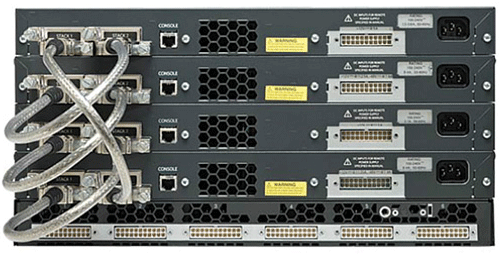
Stacking network switches is a practical solution for building an efficient local area network (LAN) at home or in the office. When multiple devices need to be connected, combining network switches enables them to function as a unified switch, simplifying management while boosting bandwidth through increased ports. This approach enhances network availability, scalability, and performance, often serving as a cost-effective alternative to upgrading to larger, more powerful switches. It’s important to note that stacking isn’t just about physically placing switches on a shelf. Stackable switches offer advanced functionality, allowing seamless management through a single IP address. They can share resources and configurations, making remote administration straightforward. Additionally, many stacking solutions provide flexibility, enabling users to combine different technologies, models, and in some cases, even brands. Here are key advantages of using stackable switches: Simplified management By stacking switches, you essentially bring them together under a unified system. This simplifies management significantly, especially in busy networks with multiple switches. With a single IP address, you can oversee and control the entire stack, making administration far more convenient and efficient. The stack master switch handles configurations and passes them to all other switches in the group, saving both time and effort compared to managing each switch individually. This streamlined approach also reduces operational costs. Increased Bandwidth Switch stacking and port aggregation are powerful techniques to enhance network bandwidth and reliability by bundling physical ports into logical connections. Stackable switches often provide significantly higher bandwidth, with some models exceeding 200Gb (e.g., 20 ports rated at 10Gb each). In contrast, standalone switches typically offer only a few 10Gb ports, if any. These capabilities make stacked switches ideal for environments that demand high-performance networking, such as data centers, advanced home labs, and video streaming setups where handling large volumes of data efficiently is crucial. High Availability The architecture of a switch stack inherently supports redundancy, ensuring network stability even during outages. If the stack master fails, a backup switch seamlessly takes over, maintaining uninterrupted operations. Additionally, link aggregation across multiple devices creates logical connections that boost both bandwidth and redundancy. This design minimizes the risk of a single point of failure, helping to maintain a stable, reliable, and high-performing network. Stackable switches excel in delivering these advantages and more. Scalability Stackable and modular solutions, such as stackable network switches, naturally offer greater scalability. While you could keep purchasing standalone switches and mounting them in a cabinet, this approach misses out on the full potential of stackable systems. Unlike standalone switches, which require individual management, stackable switches function as a single entity, streamlining administration. Unless standalone switches support cloud management — a completely different approach — managing them can be far more tedious and inefficient. Stackable switches aren’t the ideal solution for everyone. They won’t address all network-related challenges and are best suited for specific use cases based on your network requirements. Compared to standalone switches, stacks come with certain drawbacks. One major consideration is cost—modular chassis systems can often be more economical and customizable to meet extensive port requirements. Additionally, stackable switches require specialized hardware with stack-compatible architectures, which may not provide the same level of resiliency and redundancy as high-end modular switches. Conclusion Stackable switches aren’t the ideal solution for everyone. They won’t address all network-related challenges and are best suited for specific use cases based on your network requirements. Compared to standalone switches, stacks come with certain drawbacks. One major consideration is cost—modular chassis systems can often be more economical and customizable to meet extensive port requirements. Additionally, stackable switches require specialized hardware with stack-compatible architectures, which may not provide the same level of resiliency and redundancy as high-end modular switches.

What Is PoE in Networking? Power over Ethernet delivers electrical power to PoE-enabled devices using your CATx network cables. Because you don’t need to run electrical wiring, PoE saves money in materials and installation time. It’s also flexible, especially for remote applications, since it doesn’t require a nearby electrical outlet. These and other benefits have led to a sharp increase in PoE’s popularity in recent years. However, the limiting factor has always been power. How Does PoE Work? The way it works is simple. Ethernet cable that meets CATx standards consists of four twisted pairs of cable, and PoE sends power over these pairs to PoE-enabled devices. First PoE standards use two twisted pairs to transmit data, while the remaining two pairs are used for power transmission. With the new PoE standards, power and data are both sent over all four twisted pairs. When the same pairs are used for both power and data, the power and data transmissions don’t interfere with each other. That’s because electricity and data are transported at opposite ends of the frequency spectrum. Electricity has a low frequency of 60 Hz or less, and data transmissions have frequencies that can range from 10 million to 100 million Hz. What Is the 802.3at PoE Standard? The original IEEE 802.3af-2003 PoE standard provides up to 15.4 W of DC power on each port. The updated IEEE 802.3at-2009 PoE standard, also known as PoE+ or PoE plus, allows for up to 30 W of power to Type 2 devices. That’s sufficient power for devices such as VoIP phones, wireless access points, and security cameras. But it’s not enough for technology like flat screen displays, LED lighting, or retail POS terminals. Introducing the 802.3bt PoE Standard To meet the demand for higher power, the IEEE released a new PoE standard at the end of 2018, to significantly increase capacity. IEEE 802.3bt allows for up to 60 W to 100 W of power at the source by providing power over four pairs of wires (compared to the previous technology’s ability to power over just two pairs). This increase in power allows you to use PoE for a greater range devices and applications. As an added benefit, the new standard will boost energy efficiency by minimizing power loss in the cable, potentially cutting power loss in half. The new standard will include support for 2.5GBASE-T, 5GBASE-T and 10GBASE-T, while existing standards have a maximum speed of 1-Gbps. This new support will create intermediate data speeds between existing standards. PoE Types and Power Levels Previous PoE technology included PoE Type 1, also called IEEE 802.3af, and PoE Type 2, better known as 802.3at or PoE+. Both utilise 2-pair Power over Ethernet, Type 1 with a maximum of 15.4 W per port and Type 2 with a maximum of 30 W per port. With the new 802.3bt standard come two new options: Type 3 and Type 4. Type 3 is also called 4-pair PoE, 4PPoE, PoE++, or UPoE. It provides 60 W of power per port and is ideal for video conferencing equipment, multi-radio wireless access points, PTZ cameras, and building management devices. Type 4 (another designation is high-power PoE) offers the highest power capabilities, potentially up to 100 W of DC power (71.3 W to each device), and can support flat screens and laptops. For more detailed specifications on PoE Type 4 and other types, you can refer to the following table. Name IEEE Standard Power to Powered Device (PD) Max. Power per Port Energized Pairs Supported Devices PoE IEEE 802.3af 12.95 W 15.4 W 2-pair Static surveillance cameras, VoIP phones, wireless access points PoE+ IEEE 802.3at 25.5 W 30 W 2-pair PTZ cameras, video IP phones, alarm systems PoE++ IEEE 802.3bt (Type 3) 51 W 60 W 4-pair Video conferencing equipment, multi-radio wireless access points PoE++ IEEE 802.3bt (Type 4) 71.3 W 100 W 4-pair Laptops, flat screens PoE Applications and Benefits Use one set of twisted-pair wires for both data and low-wattage appliances. In addition to the applications noted above, PoE also works well for video surveillance, building management, retail video kiosks, smart signs, vending machines, and retail point-of-information systems. Save money by eliminating the need to run electrical wiring. Easily move an appliance with minimal disruption. If your LAN is protected from power failure by a UPS, the PoE devices connected to your LAN are also protected from power failure. Black Box offers a wide range of PoE products that allow you to take advantage of higher-power capabilities of PoE such as the following: PoE Ethernet Switches PoE Ethernet Switches can act as a power source equipment besides their usual functions. They inject power into the Ethernet cable to power the attached PoE-enabled devices such as wireless access points and security cameras. PoE Splitters PoE Splitters receive a PoE signal with data and power. They separate data and power onto two different lines to support non-PoE devices. PoE Repeaters/ PoE Extenders Enable extension of PoE connections beyond the 100-meter limit to access far away PoE devices such as access points, cameras, and VoIP phones. PoE Media Converters PoE Media Converters are the ideal way to extend your network over fibre or copper and also provide power to remote PoE devices to long-distance data links. They act as a copper to fibre converter and power source equipment all in one device. PoE Injectors PoE injectors carry data and power simultaneously over a single Ethernet cable. These type of Injectors power various VoIP phones, security system cameras, wireless network access points, Bluetooth® access points, and other 802.3af-compatible equipment. With it, you avoid the cost and hassle of installing AC power at remote cameras, access point, or thin client. Move equipment from room to room without costly, time-consuming rewiring.